
This post may contain affiliate links. As an Amazon Associate, I earn from qualifying purchases
If you’ve ever wished your house could just do things for you — like turn on the lights, make your coffee, or adjust the thermostat before you get home — you’re in the right place.
This Smart Home Starter Guide (2025) is your simple, step-by-step roadmap to start building a smart home on any budget.
What You’ll Learn in This Smart Home Starter Guide
✅ Why you might want to go smart
✅ How to plan and budget (without wasting money)
✅ Which ecosystem to choose (Alexa, Google, or Apple)
✅ Beginner-friendly devices you can start with today
Let’s jump in!
💡 Why Build a Smart Home?
Imagine walking through your door after work and your home just knows what to do — the lights turn on, your favorite playlist starts, and the temperature is perfect.
That’s what a smart home can do and this smart home starter guide will help you accomplish that.
But it’s not just about convenience. Here are the main reasons people go smart:
1️⃣ Convenience
Control your home with your voice, phone, or automation routines.
Say things like:
“Alexa, turn on the living room lights.”
“Hey Google, lock the front door.”
2️⃣ Energy Savings
Smart homes aren’t just cool — they’re efficient.
Devices like smart thermostats and lights can lower your energy bills by 10–20% automatically.
💰 You can start small: even a couple of smart plugs on Amazon can help by cutting standby power use.
3️⃣ Security & Peace of Mind
Keep an eye on things from anywhere.
Smart doorbells, cameras, and locks let you see who’s at the door, lock it remotely, and get alerts if something looks off.
📹 A simple video doorbell or indoor camera can make a big difference.
4️⃣ Comfort & Personalization
Your home adapts to you.
Set routines like:
- “Good morning” = lights fade in, thermostat warms up, coffee maker turns on.
- “Movie night” = lights dim, TV and soundbar turn on.
Here is the Smart home starter guide in 5 steps
🧩 Step 1: Plan Your Smart Home (Before Buying Anything)
The biggest mistake beginners make? Buying random devices that don’t work together.
Let’s fix that with a simple plan 👇
🎯 Define Your Goals
Ask yourself:
- Do I want convenience?
- Energy savings?
- Security?
Your answers will guide your first few purchases.
For example:
- Energy goal: Start with a smart thermostat or smart plugs.
- Security goal: Begin with a video doorbell and smart lock.
- Convenience goal: Grab a voice assistant hub and some smart bulbs.
💵 Budget Smartly
You don’t need to go all-in right away.
Start small — $100–$300 is enough to get your first setup running.
You can always add more later.
💡 Example starter plan:
| Room | Device | Budget |
| Living Room | Echo Dot + 2 Smart Bulbs | $70 |
| Entryway | Smart Lock | $100 |
| Bedroom | Smart Plug + Smart Light | $40 |
🏡 Step 2: Choose Your Smart Home Ecosystem
There are 3 big ones:
- Amazon Alexa (Echo devices) https://amzn.to/3XumI6u
- Google Home (Nest devices) https://amzn.to/49YdEOC
- Apple HomeKit (HomePod + Siri) HomePod mini – Apple
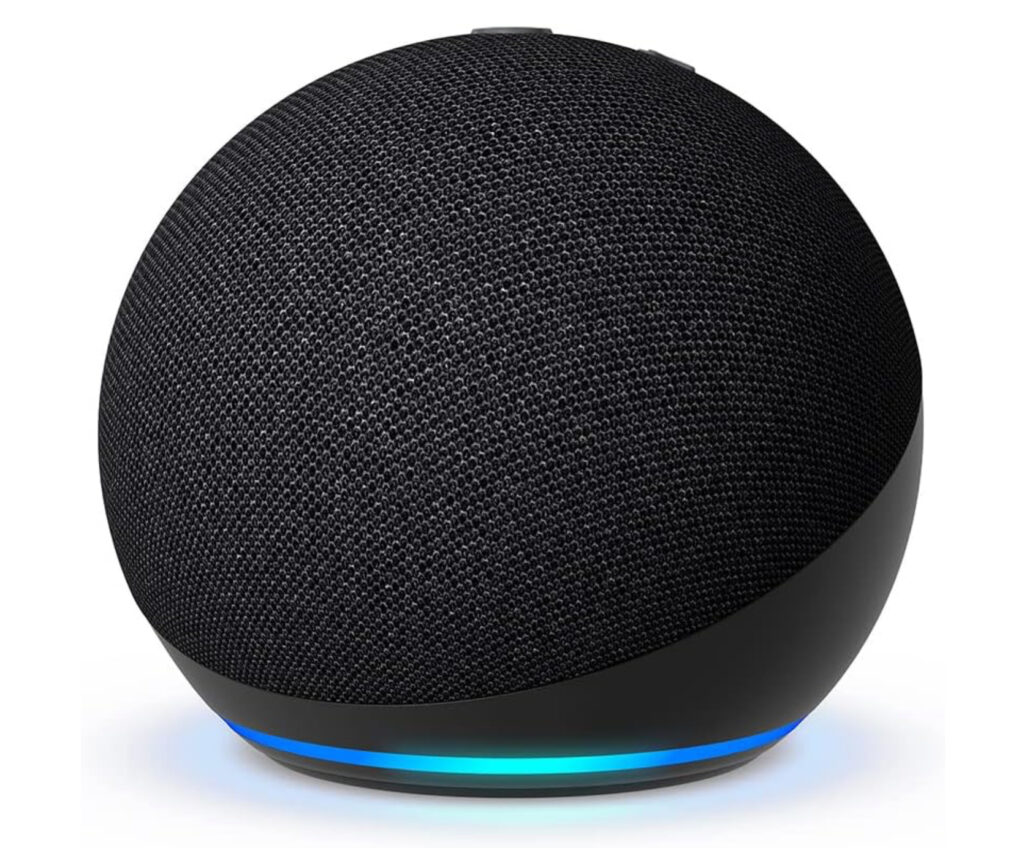
Here’s a quick breakdown to help you pick 👇
| Ecosystem | Best For | Starter Device | Example Link |
| Amazon Alexa | Best compatibility, most budget-friendly | Echo Dot (5th Gen) | View on Amazon |
| Google Home | Best for Android users, smart answers | Google Nest Hub (2nd Gen) | View on Amazon |
| Apple HomeKit | Best privacy & Apple integration | HomePod mini | View on Apple |
💡 Pro tip:
Stick to one ecosystem for now — it keeps things simple.
Later, you can mix and match (thanks to the new Matter standard).
🔌 Step 3: Start with These Beginner-Friendly Devices
Ready to get hands-on?
Here are some great entry-level devices to start your smart home today:
🎙️ Smart Speaker or Display (Your Hub)
Think of this as your smart home’s brain.
Amazon Echo Dot (5th Gen) – affordable, fast, and works with 100,000+ devices.
Google Nest Hub (2nd Gen) – comes with a screen to show timers, photos, or security cameras.
🔌 Smart Plugs
Plug any regular lamp or appliance into one, and now you can turn it on/off from your phone or voice.
Perfect for lamps, fans, and coffee makers.
⭐ Recommended:
- TP-Link Kasa Smart Plug (Works with Alexa and Google Home but not Apple Homekit) → Check price
- Wyze Smart Plug (Works with Alexa and Google Home but not Apple Homekit)→ See deals
💡 Smart Lighting Starter Kit
Control brightness, color, and schedules — right from your phone.
⭐ Recommended:
- Philips Hue Starter Kit (Works with Alexa, Google Home and Apple Homekit) → View on Amazon
- Sengled Smart Bulbs (no hub needed) (designed to work exclusively with Amazon Alexa) → View on Amazon
These kits usually include 2–4 bulbs and a hub.
They’re fun, easy to install, and make your home instantly smarter.
🌡️ Smart Thermostat
A smart thermostat learns your schedule and saves energy automatically.
⭐ Recommended:
- Google Nest Learning Thermostat (Compatible with Alexa) → See on Amazon
- ecobee Smart Thermostat Premium (Works with Siri, Alexa, Google Assistant) → Check price
🔒 Smart Lock or Doorbell (Optional but Great)
- Ring Video Doorbell → View on Amazon
- Schlage Encode Smart Lock (Wi-Fi) → See on Amazon
These add serious convenience and peace of mind.
🧠 Step 4: Keep It Secure
Smart homes are amazing — but don’t forget to stay safe:
- Use strong passwords (don’t reuse the same one).
- Turn on 2FA (two-factor authentication) in your device apps.
- Keep your Wi-Fi router updated (a mesh router like TP-Link Deco is a great upgrade).
- Update your device firmware regularly.
A secure network = a happy, reliable smart home.
🚀 Step 5: Build Slowly — One Room at a Time
Don’t try to automate everything in one weekend.
Pick one room, set it up, learn the app, and then move on.
✅ Start simple:
- Add a voice hub
- Add 2 smart plugs
- Add 2–3 smart bulbs
- Try one routine (“Good morning” or “Movie night”)
Once you see how easy it is, you’ll want to expand naturally.
🏁 Final Thoughts
We hope this Smart Home Starter Guide helped you feel confident to begin your setup. Building your first smart home doesn’t have to be complicated or expensive.
All you really need to start is a hub, a couple of smart plugs, and maybe a smart bulb or thermostat.
Then, piece by piece, you can make your home as connected (and comfortable) as you want.
So grab your first device today, plug it in, and say:
“Alexa, let’s make this home smart!”
Welcome to your new, connected lifestyle. 🎉
🔗 Quick Shopping Links Recap
(Add your Amazon affiliate links to each product below once your account is active.)
| Category | Product | Example Link Placeholder |
| Smart Hub | Amazon Echo Dot (5th Gen) | View on Amazon |
| Smart Hub | Google Nest Hub (2nd Gen) | View on Amazon |
| Smart Plug | TP-Link Kasa Smart Plug | Check price |
| Lighting | Philips Hue Starter Kit | View on Amazon |
| Thermostat | Nest Learning Thermostat | See on Amazon |
| Security | Ring Video Doorbell | View on Amazon |
| Router | TP-Link Deco Mesh System | Amazon Link |